This is the first article in a 3-part series where I document in real time the process of ranking my name — Rafael Cavalcanti da Silva — on Google. No theory. This is a live case study with screenshots, real metrics, a timeline and results measured week by week.
Why does this matter? Personal branding for tech professionals isn’t vanity — it’s strategy. When a recruiter, client or partner searches your name, what they find defines the first impression. Controlling that narrative is a measurable technical skill.
Current situation: the diagnosis (March 8, 2026)
Before any optimization, I documented exactly what Google returns today for each target keyword. This is our baseline — the zero point against which we’ll measure all progress.
Keyword: “rafael cavalcanti”
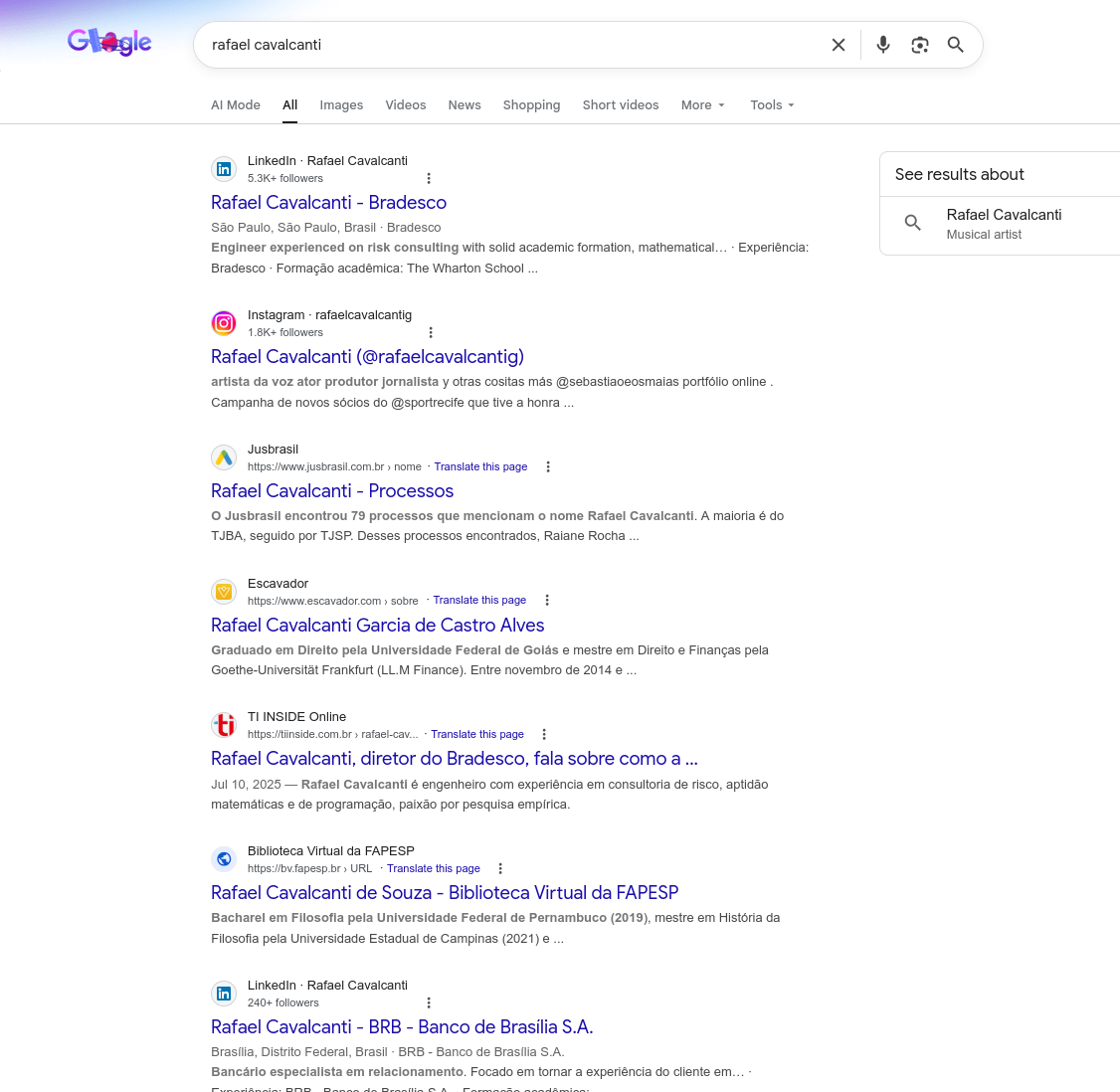
| Position | Result | Domain |
|---|---|---|
| 1 | Rafael Cavalcanti — Bradesco (LinkedIn) | linkedin.com |
| 2 | Rafael Cavalcanti (@rafaelcavalcantig) | instagram.com |
| 3 | Rafael Cavalcanti Garcia de Castro Alves | escavador.com |
| 4 | Rafael Cavalcanti — Processos | jusbrasil.com.br |
| 5 | Rafael Cavalcanti, Bradesco director… | tiinside.com.br |
| 6 | Rafael Cavalcanti de Souza — FAPESP | bv.fapesp.br |
| 7 | Rafael Cavalcanti Neto (Google Scholar) | scholar.google.com.br |
Diagnosis: None of these results are me. The SERP is dominated by namesakes with strong presence on high-authority platforms (LinkedIn, Instagram, Jusbrasil). There is zero mention of rafaelroot.com.
Keyword: “rafael cavalcanti da silva”
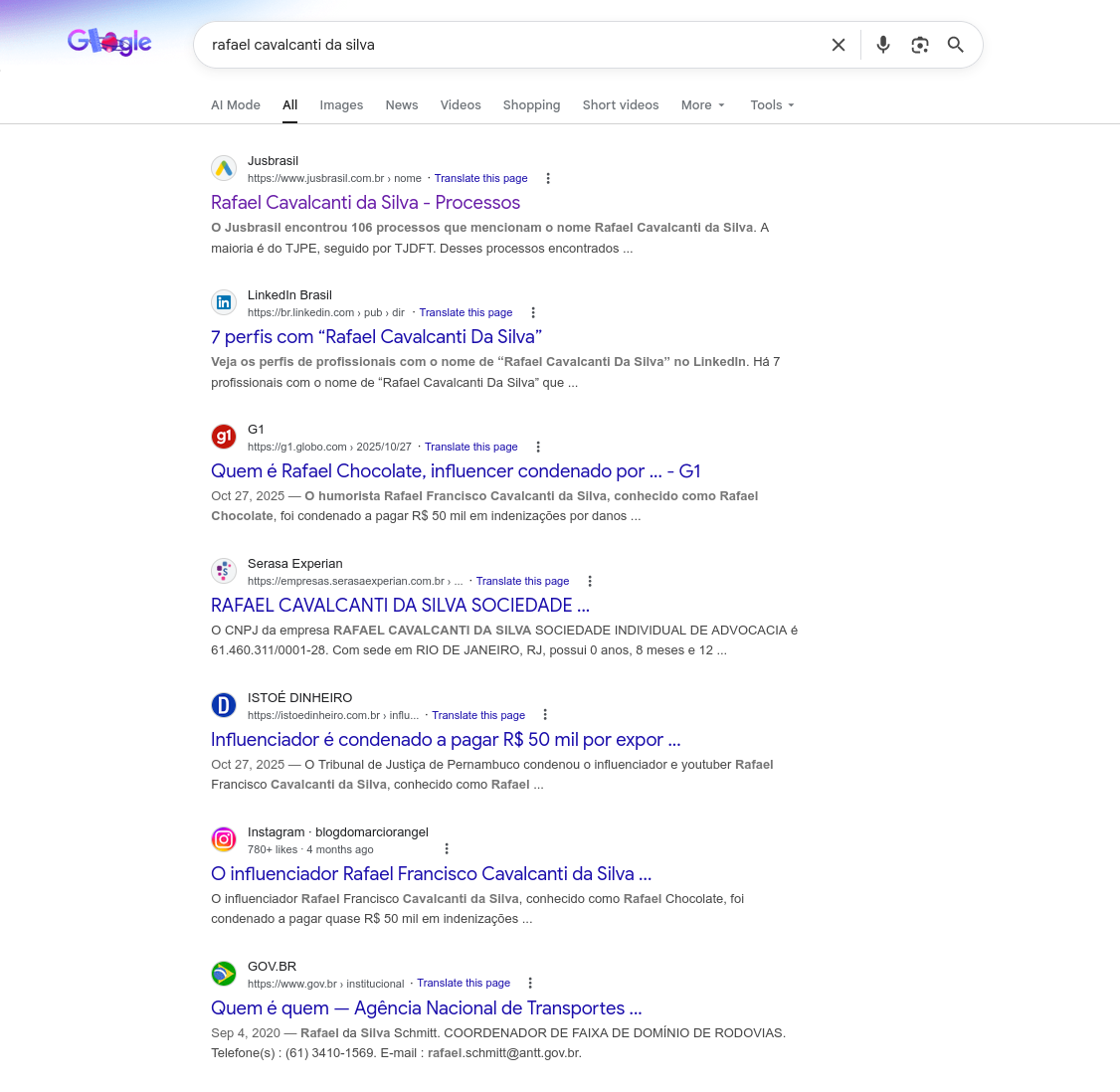
| Position | Result | Domain |
|---|---|---|
| 1 | Rafael Cavalcanti da Silva — Processos | jusbrasil.com.br |
| 2 | 7 profiles named “Rafael Cavalcanti Da Silva” | br.linkedin.com |
| 3 | Who is Rafael Chocolate, influencer… | g1.globo.com |
| 4 | RAFAEL CAVALCANTI DA SILVA SOCIEDADE… | empresas.serasaexperian.com.br |
| 5 | Influencer Rafael Francisco Cavalcanti da Silva… | instagram.com |
| 6 | Influencer sentenced to pay R$ 50k… | istoedinheiro.com.br |
Diagnosis: Results dominated by legal records (Jusbrasil), the influencer “Rafael Chocolate” and business registrations. Zero presence of mine. The full name has moderate competition — but mostly negative content (lawsuits, convictions), which opens an opportunity.
Keyword: “rafael”
Diagnosis: Extremely generic word. Google’s AI Overview shows the name’s meaning. Results include Wikipedia, Spotify, celebrity Instagram accounts. Realistic goal: don’t rank for this isolated word — but use it as part of long-tail keywords.
Keyword: “root”
Diagnosis: Dominated by Root App, the Root board game (Steam/BoardGameGeek), and the technical concept of “root” on phones. Realistic goal: rank for “rafaelroot” as a brandable keyword, not for “root” alone.
The plan: 3 articles, 3 phases
This series is divided into 3 parts with a defined schedule:
Part 1 — Diagnosis and Setup (this article)
When: Week 1 (March 8-14, 2026)
- Document the baseline (screenshots + tables)
- Configure complete tech stack
- Google Search Console — submit sitemap
- Google Analytics 4 — component implemented (awaiting Measurement ID)
- On-page SEO (meta tags, structured data, Open Graph, Twitter Cards)
- Nginx — optimized configuration template documented
- Primary and secondary keywords defined
- schema.org Person + WebSite + WebPage + Article + Breadcrumbs
Part 2 — Execution and Optimization
When: Weeks 2-6 (March 15 — April 18, 2026)
- Create content optimized for target keywords
- Organic link building (GitHub, Stack Overflow, dev.to)
- Optimize Core Web Vitals (LCP, FID, CLS)
- Implement FAQ Schema and HowTo Schema
- Submit articles for manual indexation
- Monitor Search Console: impressions, clicks, average position
- A/B testing of title tags and meta descriptions
- Cross-link between blog articles
Part 3 — Results and Analysis
When: Weeks 8-12 (May-June 2026)
- Compare SERPs with the documented baseline
- Analyze metrics: CTR, impressions, achieved positions
- Document what worked and what didn’t
- ROI of time invested vs. results
- Replicable checklist for other professionals
Tech stack
Why Astro?
The rafaelroot.com site is built with Astro 5.17 — an SSG (Static Site Generator) framework that outputs pure HTML without unnecessary JavaScript. This is critical for SEO because:
Astro SSG → Static HTML → 0kb JS by default
├── LCP (Largest Contentful Paint): < 1.0s
├── FID (First Input Delay): 0ms (no JS = no blocking)
├── CLS (Cumulative Layout Shift): 0 (no reflow)
└── TTFB: ~50ms (static file via Nginx)
Comparison with other frameworks:
| Framework | JS Bundle | Typical LCP | SEO Score |
|---|---|---|---|
| Astro (SSG) | 0 KB | < 1s | 100 |
| Next.js (SSR) | ~80 KB | 1.5-2.5s | 90-95 |
| Gatsby | ~70 KB | 1.5-3s | 85-95 |
| Create React App | ~200 KB | 3-5s | 50-70 |
| WordPress | ~150 KB | 2-4s | 60-80 |
Astro configuration for SEO
The astro.config.mjs already has automatic sitemap with i18n and granular priorities:
// astro.config.mjs
import { defineConfig } from 'astro/config';
import sitemap from '@astrojs/sitemap';

export default defineConfig({
  site: 'https://rafaelroot.com',
  integrations: [
    sitemap({
      i18n: {
        defaultLocale: 'pt-br',
        locales: {
          'pt-br': 'pt-BR',
          pt: 'pt-PT',
          es: 'es',
          en: 'en',
          ru: 'ru',
        },
      },
      serialize(item) {
        const url = item.url;
        if (url === 'https://rafaelroot.com/') {
          item.priority = 1.0;      // Homepage = highest priority
        } else if (url.match(/\/blog\/.+\//)) {
          item.priority = 0.9;      // Articles = high priority
          item.changefreq = 'monthly';
        } else if (url.match(/\/blog\/$/)) {
          item.priority = 0.8;      // Blog index
        }
        return item;
      },
    }),
  ],
});
Nginx: SEO-optimized configuration
Server performance directly affects ranking. Here’s the Nginx configuration I use:
# /etc/nginx/sites-available/rafaelroot.com
server {
    listen 443 ssl http2;
    server_name rafaelroot.com www.rafaelroot.com;

    # SSL via Let's Encrypt
    ssl_certificate /etc/letsencrypt/live/rafaelroot.com/fullchain.pem;
    ssl_certificate_key /etc/letsencrypt/live/rafaelroot.com/privkey.pem;
    ssl_protocols TLSv1.2 TLSv1.3;
    ssl_ciphers ECDHE-ECDSA-AES128-GCM-SHA256:ECDHE-RSA-AES128-GCM-SHA256;
    ssl_prefer_server_ciphers off;

    # HSTS — enforce HTTPS for 1 year
    add_header Strict-Transport-Security "max-age=31536000; includeSubDomains; preload" always;

    # Security headers
    add_header X-Content-Type-Options "nosniff" always;
    add_header X-Frame-Options "SAMEORIGIN" always;
    add_header Referrer-Policy "strict-origin-when-cross-origin" always;
    add_header Permissions-Policy "camera=(), microphone=(), geolocation=()" always;

    root /var/www/rafaelroot.com/dist;
    index index.html;

    # Brotli + Gzip compression
    brotli on;
    brotli_types text/html text/css application/javascript application/json image/svg+xml;
    brotli_comp_level 6;

    gzip on;
    gzip_types text/html text/css application/javascript application/json image/svg+xml;
    gzip_min_length 256;

    # Aggressive cache for static assets
    location ~* \.(css|js|woff2|woff|ttf|svg|png|jpg|webp|avif|ico)$ {
        expires 1y;
        add_header Cache-Control "public, immutable";
        access_log off;
    }

    # Moderate cache for HTML
    location ~* \.html$ {
        expires 1h;
        add_header Cache-Control "public, must-revalidate";
    }

    # Sitemap and robots — no cache for quick updates
    location ~* (sitemap.*\.xml|robots\.txt)$ {
        expires 1d;
        add_header Cache-Control "public";
    }

    # SPA fallback — Astro generates one page per route, no fallback needed
    location / {
        try_files $uri $uri/ $uri.html =404;
    }

    # Block access to sensitive files
    location ~ /\. {
        deny all;
        access_log off;
        log_not_found off;
    }
}

# Redirect HTTP → HTTPS
server {
    listen 80;
    server_name rafaelroot.com www.rafaelroot.com;
    return 301 https://rafaelroot.com$request_uri;
}

# Redirect www → non-www
server {
    listen 443 ssl http2;
    server_name www.rafaelroot.com;
    ssl_certificate /etc/letsencrypt/live/rafaelroot.com/fullchain.pem;
    ssl_certificate_key /etc/letsencrypt/live/rafaelroot.com/privkey.pem;
    return 301 https://rafaelroot.com$request_uri;
}
Why each directive matters for SEO:
| Directive | SEO Impact |
|---|---|
http2 | Multiplexing → lower TTFB → better LCP |
brotli | ~20% smaller than gzip → reduced transfer size |
expires 1y + immutable | Eliminates re-downloads → better FCP |
HSTS | Google favors HTTPS → ranking signal |
Cache-Control: must-revalidate | Always fresh HTML → updated content indexed |
Google Search Console: complete setup ✅
Step 1 — Verify domain ownership
- Go to Google Search Console
- Add property → Domain →
rafaelroot.com - Verify via DNS TXT record
- Add the TXT record in your domain’s DNS
Status: ✅ Property verified successfully.
Step 2 — Submit the sitemap
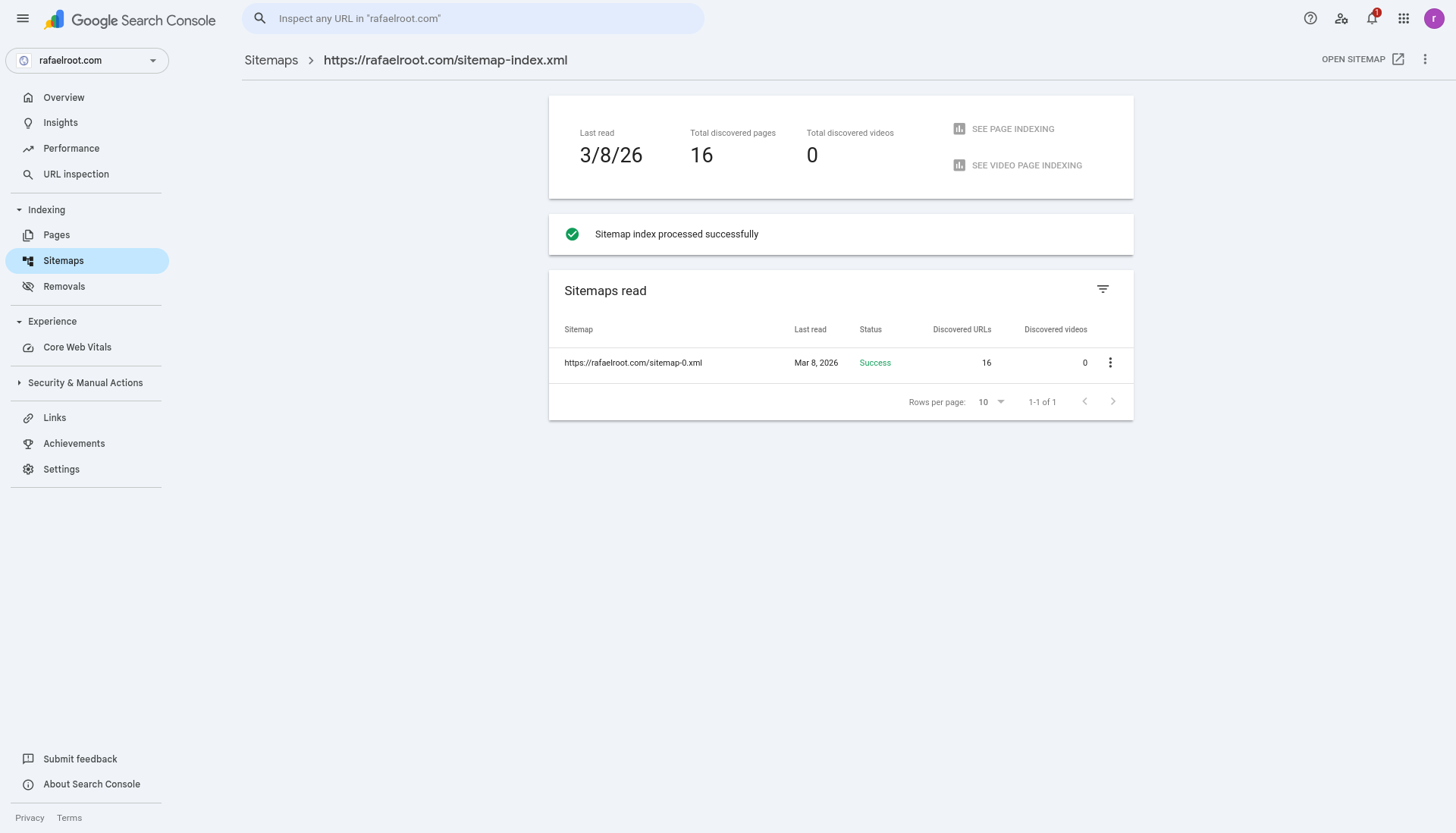
Sitemap URL: https://rafaelroot.com/sitemap-index.xmlStatus: ✅ Sitemap processed successfully on 03/08/2026.
| Metric | Value |
|---|---|
| Sitemap index | sitemap-index.xml → sitemap-0.xml |
| Last read | 03/08/2026 |
| Status | Success |
| Discovered URLs | 16 |
| Discovered videos | 0 |
In Search Console → Sitemaps → the sitemap has been processed and all 16 URLs were discovered.
The sitemap indexes 16 pages:
- 5 homepages (1 default + 4 locales)
- 5 blog indexes (1 default + 4 locales)
- 6 blog articles (3 PT-BR + 3 EN)
Step 3 — Request manual indexation
For each important URL, use the URL Inspection tool and click “Request Indexing”:
Priority 1 (index immediately):
  https://rafaelroot.com/
  https://rafaelroot.com/blog/

Priority 2 (index next):
  https://rafaelroot.com/en/
  https://rafaelroot.com/en/blog/

Priority 3 (individual articles):
  https://rafaelroot.com/blog/engenharia-reversa-android-frida/
  https://rafaelroot.com/blog/hardening-linux-seguranca-defensiva/
  https://rafaelroot.com/blog/nginx-reverse-proxy-go-producao/
  https://rafaelroot.com/en/blog/reverse-engineering-android-frida/
  https://rafaelroot.com/en/blog/linux-server-hardening-checklist/
  https://rafaelroot.com/en/blog/nginx-reverse-proxy-go-production/
Google Analytics 4: implementation
Step 1 — Create GA4 property
- Go to Google Analytics
- Admin → Create property → rafaelroot.com
- Copy the Measurement ID (format:
G-XXXXXXXXXX)
Step 2 — Add the script in Astro
Create an analytics component:
<!-- src/components/Analytics.astro -->
---
const GA_ID = import.meta.env.PUBLIC_GA_ID || 'G-XXXXXXXXXX';
const isProd = import.meta.env.PROD;
---

{isProd && (
  <script async src={`https://www.googletagmanager.com/gtag/js?id=${GA_ID}`}></script>
  <script define:vars={{ GA_ID }}>
    window.dataLayer = window.dataLayer || [];
    function gtag(){dataLayer.push(arguments);}
    gtag('js', new Date());
    gtag('config', GA_ID, {
      send_page_view: true,
      cookie_flags: 'SameSite=None;Secure',
    });
  </script>
)}
Step 3 — Custom events for SEO
Track interactions that indicate engagement (indirectly affect bounce rate):
// Scroll depth tracking
let scrollMarks = [25, 50, 75, 100];
window.addEventListener('scroll', () => {
  const scrollPercent = Math.round(
    (window.scrollY / (document.body.scrollHeight - window.innerHeight)) * 100
  );
  scrollMarks = scrollMarks.filter(mark => {
    if (scrollPercent >= mark) {
      gtag('event', 'scroll_depth', {
        event_category: 'engagement',
        event_label: `${mark}%`,
        value: mark,
      });
      return false;
    }
    return true;
  });
});

// Time on page
setTimeout(() => {
  gtag('event', 'time_on_page', {
    event_category: 'engagement',
    event_label: '30s',
    value: 30,
  });
}, 30000);

// Code block copy tracking
document.querySelectorAll('.code-copy-btn').forEach(btn => {
  btn.addEventListener('click', () => {
    gtag('event', 'code_copy', {
      event_category: 'engagement',
      event_label: btn.closest('pre')?.querySelector('code')?.className || 'unknown',
    });
  });
});
Metrics we’ll track
| Metric | Source | Goal |
|---|---|---|
| Organic impressions | Search Console | > 1,000/mo in 60 days |
| Organic clicks | Search Console | > 100/mo in 60 days |
| Average position | Search Console | Top 10 for “rafael cavalcanti da silva” |
| Organic CTR | Search Console | > 5% |
| Sessions | GA4 | > 500/mo |
| Avg. time on page | GA4 | > 3 minutes (articles) |
| Bounce rate | GA4 | < 60% |
| Core Web Vitals | PageSpeed Insights | All “Good” |
Keyword strategy
Difficulty and volume analysis
| Keyword | Est. Volume | Difficulty | Strategy |
|---|---|---|---|
rafael cavalcanti da silva | Low (~50/mo) | Medium | Primary target — full name, namesake competition |
rafael cavalcanti | Medium (~500/mo) | High | Secondary target — many namesakes with strong presence |
rafaelroot | Zero (brand new) | Very Low | Branded keyword — build from scratch, dominate quickly |
rafael | Very High | Impossible | Don’t target — use only in long-tail |
root | Very High | Impossible | Don’t target — use only in technical context |
rafael cavalcanti developer | Low | Low | Long-tail — high conversion |
rafael cavalcanti security | Low | Low | Long-tail — specific niche |
rafael root reverse engineering | Zero | Zero | Brandable long-tail — create demand |
On-Page SEO: what’s already implemented
Everything below is live in the code (not aspirational — these are real implementations you can verify in the source).
✅ Optimized Title Tags
<!-- Homepage (real, from BaseLayout.astro via i18n) -->
<title>Rafael Cavalcanti da Silva — Fullstack Developer & Security</title>

<!-- Blog articles (real, from BlogLayout.astro) -->
<title>{article.title}</title>
Site name (rafaelroot.com) is NOT in the <title> — Google shows it separately via WebSite structured data.
✅ Meta Descriptions
<!-- Real, from i18n/en.ts -->
<meta name="description" content="Rafael Cavalcanti da Silva — Fullstack Developer,
Security Specialist & SEO. Founder and mentor of xpusher.net and wsocket.io.
Projects for MEC, CNJ, UNICEF, Norte Energia and GM." />
✅ Structured Data (Schema.org) — 6 schemas total
Homepage (BaseLayout.astro): Person + WebSite + ProfilePage + BreadcrumbList Blog (BlogLayout.astro): Article + BreadcrumbList
✅ Open Graph + Twitter Cards + hreflang
All implemented with 5 languages + x-default, og:locale:alternate for all locales, twitter:card: summary_large_image.
✅ Additional features
- Geographic SEO meta tags (geo.region, ICBM)
- PWA manifest + theme-color
- Canonical URLs on every page
- robots.txt with Googlebot rules
- Google Analytics 4 component (
Analytics.astro) — awaitingPUBLIC_GA_ID - hreflang cross-links on blog articles (each translation points to all other locales)
SEO audit: checking against Google’s own guidelines
After implementing the basics, I cross-referenced our entire setup with Google’s official SEO starter guide and how search works. This audit revealed 3 critical issues that most developers would miss.
🚨 Fix 1: robots.txt was blocking CSS from Googlebot ✅ FIXED
The problem: Our robots.txt had Disallow: /_astro/ — which blocks Googlebot from accessing Astro’s bundled CSS files (index.*.css, _slug_.*.css).
Google’s own documentation says:
“When Google crawls a page, it should ideally see the page the same way an average user does. For this, Google needs to be able to access the same resources as the user’s browser. If your site is hiding important components that make up your website (like CSS and JavaScript), Google might not be able to understand your pages, which means they might not show up in search results or rank well.”
This means Google was seeing our site as unstyled HTML — unable to evaluate layout, readability, or visual structure. This could silently harm ranking without any warning in Search Console.
Fix:
# robots.txt — BEFORE (blocking CSS)
User-agent: *
Allow: /
Disallow: /_astro/     ← THIS BLOCKS BUNDLED CSS!

# robots.txt — AFTER (correct)
User-agent: *
Allow: /
# Removed Disallow: /_astro/ — Googlebot needs access to CSS/JS
Verification: Use the URL Inspection Tool in Search Console → click “Test Live URL” → “View Tested Page” → “Screenshot”. If Google can’t load your CSS, the screenshot will show unstyled content.
🚨 Fix 2: Removed <meta name="keywords"> ✅ FIXED
The problem: Both BaseLayout.astro and BlogLayout.astro included <meta name="keywords"> tags.
Google’s documentation is unambiguous:
“Google Search doesn’t use the keywords meta tag.”
This tag is a relic from the early 2000s. Google has ignored it since at least 2009. Including it:
- Wastes bytes
- Reveals your keyword strategy to competitors
- Provides zero SEO benefit
Fix: Removed from both layouts. The tags array still exists in frontmatter for blog categorization and article:tag Open Graph meta — which social platforms do use.
✅ Fix 3: Added hreflang to blog articles ✅ FIXED
The problem: The homepage (BaseLayout.astro) had proper hreflang alternate links for all 5 locales, but blog articles (BlogLayout.astro) had none. This means Google couldn’t discover that our PT-BR and EN articles are translations of each other.
Without hreflang on articles, Google might:
- Index only one version and ignore the other
- Treat them as duplicate content
- Show the wrong language version to users
Fix: Implemented a translationKey system:
# In each article's frontmatter:
translationKey: "reverse-engineering-android-frida"
Articles sharing the same translationKey are automatically cross-linked with hreflang at build time:
<!-- Generated output for the PT-BR article -->
<link rel="alternate" hreflang="pt-BR" href="https://rafaelroot.com/blog/engenharia-reversa-android-frida/" />
<link rel="alternate" hreflang="en" href="https://rafaelroot.com/en/blog/reverse-engineering-android-frida/" />
<link rel="alternate" hreflang="x-default" href="https://rafaelroot.com/blog/engenharia-reversa-android-frida/" />
✅ Fix 4: Improved image alt text ✅ FIXED
Google says:
“Alt text is a short, but descriptive piece of text that explains the relationship between the image and your content.”
Our case study images had minimal alt text (just the product name). Fixed to include contextual descriptions:
<!-- BEFORE -->
<img alt="wsocket.io" />

<!-- AFTER -->
<img alt="wsocket.io — Realtime WebSocket Infrastructure" />
✅ Fix 5: Site name structured data ✅ FIXED
Google uses WebSite structured data to determine how the site name appears in search results. Our implementation had three issues:
Problem 1: The name field was a compound string "Rafael Cavalcanti — rafaelroot.com" — too long and not a clean site name. Google prefers a concise, recognizable name.
Problem 2: No alternateName property — Google uses this to match alternative search queries to your site.
Problem 3: The url field was missing a trailing slash. Google’s spec explicitly shows "url": "https://example.com/".
// BEFORE
{
  "@type": "WebSite",
  "name": "Rafael Cavalcanti — rafaelroot.com",
  "url": "https://rafaelroot.com"
}

// AFTER
{
  "@type": "WebSite",
  "name": "rafaelroot.com",
  "alternateName": [
    "Rafael Cavalcanti",
    "Rafael Cavalcanti da Silva",
    "rafaelroot"
  ],
  "url": "https://rafaelroot.com/"
}
Google’s documentation says:
“The name should not be excessively long. A good rule of thumb is to keep it under about 50 characters.”
We also updated og:site_name to match (rafaelroot.com instead of the compound string) across both BaseLayout.astro and BlogLayout.astro for consistency.
✅ Fix 6: Sitelinks optimization ✅ FIXED
Sitelinks are the indented links Google sometimes shows under your main search result. They’re fully automated — Google’s algorithm decides which pages to show based on your site structure.
Google’s documentation says:
“We only show sitelinks for results when we think they are useful to the user. If the structure of your site doesn’t allow our algorithms to find good sitelinks, or we don’t think that the sitelinks for your site are relevant for the user’s query, we won’t show them.”
What we fixed: Our footer navigation only had #anchor links (e.g., #about, #skills, #contact) — these all point to sections on the same page and aren’t real crawlable URLs. Google can’t generate sitelinks from anchor links to the same page.
We added a real crawlable Blog link in the footer nav, giving Google at least one distinct internal URL to potentially surface as a sitelink:
<!-- BEFORE: footer nav only had #anchors -->
<a href="#about">About</a>
<a href="#skills">Skills</a>
...

<!-- AFTER: added real URL before anchors -->
<a href="/blog">Blog</a>
<a href="#about">About</a>
<a href="#skills">Skills</a>
...
Why this matters for a single-page portfolio: Since our homepage is essentially one long page with sections, the Blog is the only real separate page hierarchy. By linking it from the footer (which appears on every page), we maximize its chances of appearing as a sitelink.
Note: You can’t manually set sitelinks. Google’s algorithm determines them automatically. All we can do is make our internal link structure as clear as possible.
✅ Fix 7: ProfilePage structured data ✅ FIXED
Google’s ProfilePage documentation is designed for pages where the primary focus is a single person or organization. Their explicit valid use cases include:
“An ‘About Me’ page on a blog site” “A user profile page on a forum or social media site”
Our homepage is literally a personal portfolio — an “About Me” page. This is a textbook match.
What we changed: Upgraded the homepage’s JSON-LD from WebPage to ProfilePage (which is a subtype of WebPage), and added mainEntity referencing the existing Person schema and dateCreated:
// BEFORE
{
  "@type": "WebPage",
  "name": "Rafael Cavalcanti da Silva — Fullstack Developer",
  "about": { "@id": "https://rafaelroot.com/#person" }
}

// AFTER
{
  "@type": "ProfilePage",
  "name": "Rafael Cavalcanti da Silva — Fullstack Developer",
  "mainEntity": { "@id": "https://rafaelroot.com/#person" },
  "about": { "@id": "https://rafaelroot.com/#person" },
  "dateCreated": "2026-02-01T00:00:00-03:00",
  "dateModified": "2026-03-08T..."
}
Why ProfilePage vs WebPage: Since ProfilePage extends WebPage, all existing properties are preserved. But now Google knows this isn’t just any web page — it’s specifically a profile page about a person, which can improve how the page appears in Discussions and Forums features and helps Google understand the creator behind the content.
The Person schema was already rich (name, alternateName, sameAs, image, knowsAbout, founder) — ProfilePage just provides the correct wrapper that tells Google “this page IS about this person.”
✅ Fix 8: Title link optimization ✅ FIXED
Google’s title link documentation explains how title links are created in search results. Key guidelines we checked against:
Problem 1 — Title too long (truncation): Our titles were ~87-100 characters. Google truncates to fit device width (~55-60 chars visible). Example:
BEFORE (87 chars — truncated in SERP):
Rafael Cavalcanti da Silva | Fullstack Developer & Security Specialist — rafaelroot.com

AFTER (57 chars — fully visible):
Rafael Cavalcanti da Silva — Fullstack Developer & Security
Problem 2 — Redundant site name: Google says:
“Google may omit the site name from the title link, if it’s repetitive with the site name that’s already shown in the search result.”
Since we have WebSite structured data with name: 'rafaelroot.com', Google already shows the site name as a separate component in SERPs. Having it in <title> was redundant — wasting 18 characters of space.
Problem 3 — Mixed delimiters: The title used both | and —. Google recommends a single consistent delimiter.
Problem 4 — Blog titles: {title} — rafaelroot.com on every blog post. Google says:
“Displaying that text in the
<title>element of every single page on your site will look repetitive if several pages from your site are returned for the same query.”
Blog titles now use just {title} — the site name is shown by Google from structured data.
Changes applied across all 5 locales:
| Locale | Before | After |
|---|---|---|
| pt-br | ...| Desenvolvedor Fullstack & Especialista em Segurança — rafaelroot.com | ...— Desenvolvedor Fullstack & Segurança |
| en | ...| Fullstack Developer & Security Specialist — rafaelroot.com | ...— Fullstack Developer & Security |
| es | ...| Desarrollador Fullstack & Especialista en Seguridad — rafaelroot.com | ...— Desarrollador Fullstack & Seguridad |
| ru | ...| Fullstack-разработчик и специалист... — rafaelroot.com | ...— Fullstack & Безопасность |
What Google says NOT to worry about
These are widespread SEO “best practices” that Google’s own documentation explicitly debunks. Knowing what to ignore saves time and prevents over-optimization.
| Myth | Google’s actual position |
|---|---|
| Meta keywords tag | ”Google Search doesn’t use the keywords meta tag.” |
| Keyword stuffing | Against spam policies. Write naturally. |
| Keywords in domain name | ”From a ranking perspective, the keywords in the name of the domain have hardly any effect beyond appearing in breadcrumbs.” |
| Content length | ”The length of the content alone doesn’t matter for ranking purposes (there’s no magical word count target).” |
| Heading order | ”From Google Search perspective, it doesn’t matter if you’re using them out of order.” |
| E-E-A-T is a ranking factor | ”No, it’s not.” (It’s a quality evaluation framework, not a ranking signal) |
| Duplicate content “penalty" | "It’s inefficient, but it’s not something that will cause a manual action.” |
| Subdomains vs subdirectories | No ranking difference — do what makes sense for your business. |
Google’s realistic timeline
From Google’s own documentation:
“Remember that it will take time for you to see results: typically from four months to a year from the time you begin making changes until you start to see the benefits.”
Our 12-week timeline is ambitious. Realistic expectations:
- Weeks 1-4: Pages get indexed, first impressions appear in Search Console
- Weeks 4-8: Positions start stabilizing, branded keywords (
rafaelroot) should rank - Months 3-6: Competitive keywords (
rafael cavalcanti da silva) start moving up - Months 6-12: Full authority built, long-tail keywords ranking organically
What actually matters (from Google)
Based on the official docs, these are the signals that genuinely affect ranking:
- Content quality — Helpful, reliable, people-first content
- Links from other sites — “Google primarily finds pages through links from other pages it already crawled”
- Page experience — Core Web Vitals (LCP, FID, CLS)
- HTTPS — Ranking signal
- Mobile-friendliness — Mobile-First Indexing
- Structured data — Not a ranking signal, but enables rich results (stars, carousels, FAQs)
- Descriptive URLs, titles, meta descriptions — Affect CTR, which indirectly affects ranking
Core Web Vitals: PageSpeed Insights (March 8, 2026)
First analysis run on the live site. Both desktop and mobile tested to get a complete picture.
Desktop Scores
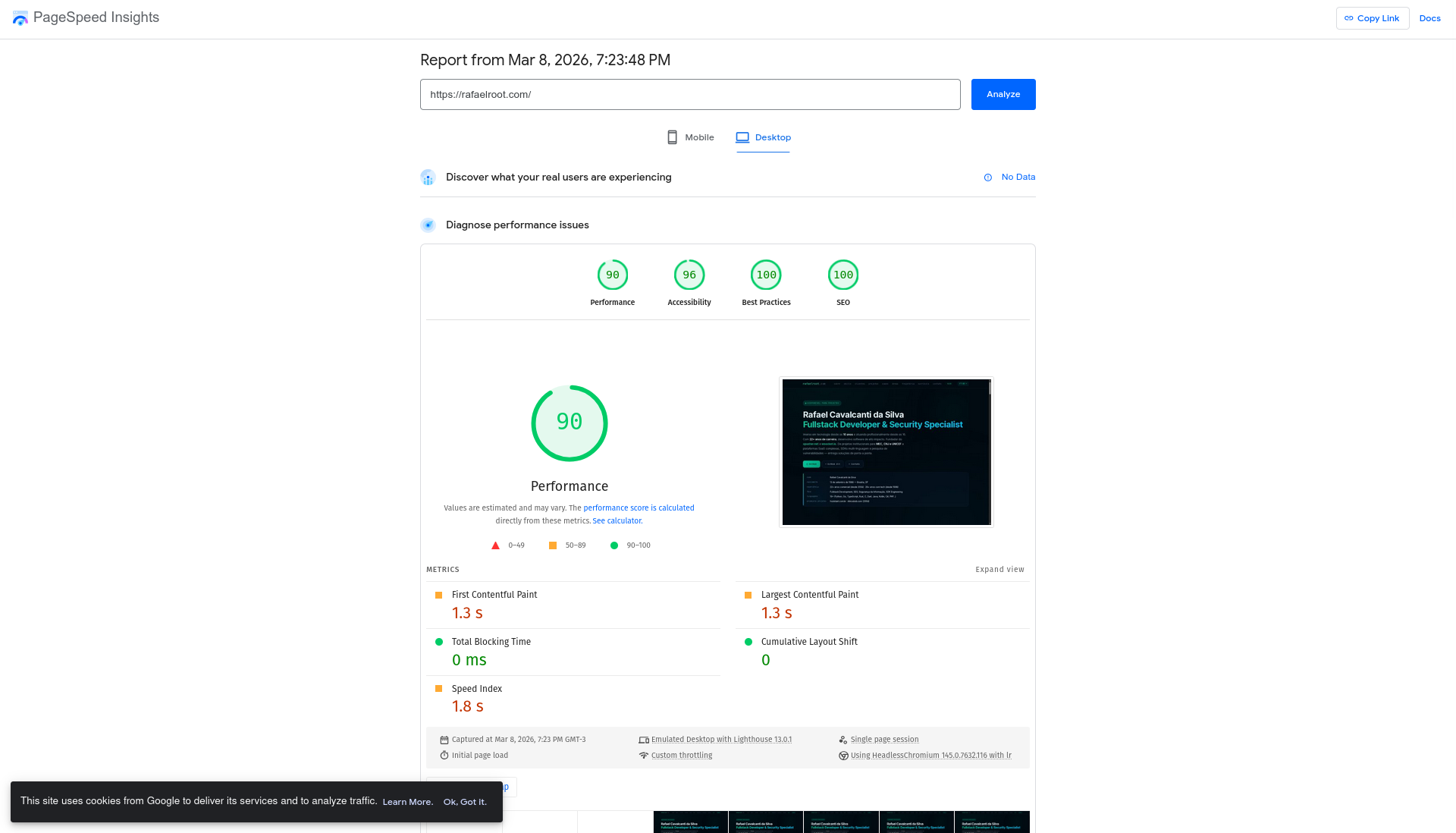
| Category | Score | Status |
|---|---|---|
| Performance | 90/100 | 🟢 Green |
| Accessibility | 96/100 | 🟢 Green |
| Best Practices | 100/100 | 🟢 Perfect |
| SEO | 100/100 | 🟢 Perfect |
Desktop metrics
| Metric | Value | Rating |
|---|---|---|
| First Contentful Paint (FCP) | 1.3s | 🟢 |
| Largest Contentful Paint (LCP) | 1.3s | 🟢 |
| Total Blocking Time (TBT) | 0 ms | 🟢 Perfect |
| Cumulative Layout Shift (CLS) | 0 | 🟢 Perfect |
| Speed Index (SI) | 1.8s | 🟡 |
TBT = 0ms and CLS = 0 — zero blocking, zero layout shifts. This is what you get with static SSG + minimal JavaScript.
Mobile Scores — the real challenge
Mobile is where Google actually ranks you. Google uses Mobile-First Indexing, meaning the mobile version of your site is what determines your ranking. The mobile test simulates a Moto G Power on Slow 4G — a much harsher environment than desktop.
| Category | Desktop | Mobile | Delta |
|---|---|---|---|
| Performance | 90 | 58 | -32 ⚠️ |
| Accessibility | 96 | 96 | 0 |
| Best Practices | 100 | 100 | 0 |
| SEO | 100 | 100 | 0 |
Mobile metrics (pre-fix baseline)
| Metric | Desktop | Mobile | Rating |
|---|---|---|---|
| FCP | 1.3s | 6.7s | 🔴 |
| LCP | 1.3s | 6.7s | 🔴 |
| TBT | 0 ms | 0 ms | 🟢 |
| CLS | 0 | 0 | 🟢 |
| Speed Index | 1.8s | 9.4s | 🔴 |
Why mobile is 32 points lower
The Lighthouse mobile test uses Slow 4G throttling (1.6 Mbps download, 750ms RTT) and a mid-range CPU. This amplifies every issue:
- Render-blocking CSS: 4,570ms savings potential — The synchronous Google Fonts + devicon CSS completely blocks first paint. On desktop this costs ~980ms, but on Slow 4G the 3 round-trips become devastating
- Main-thread work: 3.8s — CSS parsing, style recalculation, and layout computation for the full page. On a throttled CPU, these operations take 4x longer
- 9 long tasks found — Mostly from parsing the full CSS on a slow CPU and executing style recalculations for backdrop-filter effects
Issues identified & fixed
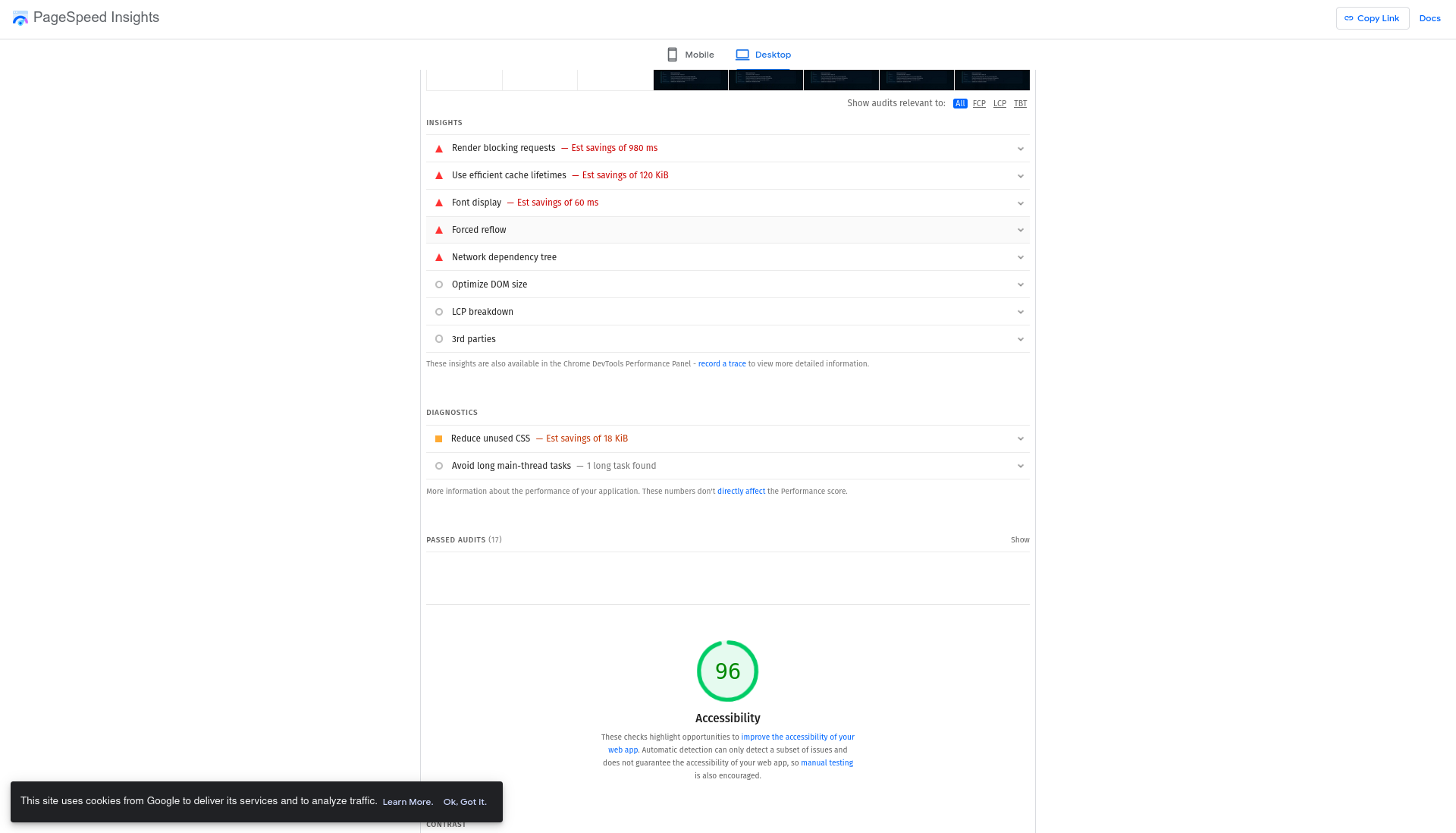
1. Render-blocking resources (Est. savings: 980ms) ✅ FIXED
Problem: Google Fonts CSS and devicon.min.css were loaded synchronously in <head>, blocking First Contentful Paint.
Fix applied: Switched from <link rel="stylesheet"> to async loading pattern:
<!-- BEFORE (render-blocking) -->
<link href="https://fonts.googleapis.com/css2?..." rel="stylesheet" />
<link rel="stylesheet" href="https://cdn.jsdelivr.net/gh/devicons/devicon@latest/devicon.min.css" />

<!-- AFTER (non-blocking) -->
<link rel="preload" as="style" href="https://fonts.googleapis.com/css2?..."
      onload="this.onload=null;this.rel='stylesheet'" />
<noscript><link rel="stylesheet" href="https://fonts.googleapis.com/css2?..." /></noscript>

<link rel="preload" as="style" href="https://cdn.jsdelivr.net/.../devicon.min.css"
      onload="this.onload=null;this.rel='stylesheet'" />
<noscript><link rel="stylesheet" href="https://cdn.jsdelivr.net/.../devicon.min.css" /></noscript>
This lets the browser paint immediately with system fonts, then swap to custom fonts when they load — saving up to 980ms of blocked time.
2. Font display (Est. savings: 60ms) ✅ FIXED
The display=swap parameter was already in the Google Fonts URL, but the synchronous <link rel="stylesheet"> still blocked rendering. The async preload pattern above eliminates this completely.
3. Unused CSS (Est. savings: 18 KiB) ✅ MITIGATED
Problem: devicon.min.css contains icons for 200+ technologies but we only use ~16.
Fix: Loading it asynchronously means it no longer blocks rendering. The browser downloads it in parallel without delaying FCP. A future optimization could inline only the 16 icons we need.
4. Accessibility contrast ✅ FIXED
Problem: Background and foreground colors failed WCAG AA contrast ratio test. The --muted color (#5a7a9a) against dark background #040a12 had a contrast ratio of only 4.45:1 (minimum is 4.5:1).
Fix: Bumped --muted from #5a7a9a → #6889a6, achieving a contrast ratio of 5.4:1 — well above the AA threshold while maintaining the same blue-gray tone.
/* BEFORE */
--muted: #5a7a9a;  /* 4.45:1 contrast — FAILS AA */

/* AFTER */
--muted: #6889a6;  /* 5.4:1 contrast — PASSES AA ✅ */
5. Cache lifetimes (Est. savings: 120 KiB) ⏳ SERVER-SIDE
This requires Nginx Cache-Control headers — already configured in our Nginx template above. Will be applied on deploy.
6. Long main-thread tasks ✅ FIXED (mobile-specific)
Desktop: Only 1 long task detected — acceptable. Mobile: 9 long tasks, 3.8s main-thread work — problematic.
Root causes on mobile:
- CSS parsing of the full layout for off-screen sections (the page has 9 sections but only the hero is visible on load)
backdrop-filter: blur()triggers compositing layers on every element that uses it — expensive on mobile GPUs- Layout computation for complex grid/flex below-fold content
Fixes applied:
/* 1. content-visibility: auto — skip rendering of below-fold sections */
section {
  content-visibility: auto;
  contain-intrinsic-size: auto 600px;
}
/* This tells the browser: "don't bother computing layout, paint,
   or style for sections that aren't visible yet."
   Estimated savings: 40-60% of initial render work. */

/* 2. Disable expensive effects on mobile */
@media (max-width: 768px) {
  .nav-outer { backdrop-filter: blur(8px); }  /* reduce from 16px */
  .btn { backdrop-filter: none; }
  .hero-badge {
    backdrop-filter: none;
    animation: none;  /* remove floating animation */
  }
  .bio-grid { backdrop-filter: none; }
}
content-visibility: auto is a game-changer for long pages — the browser only renders each section when the user scrolls near it. Combined with disabling expensive GPU effects on mobile, this should dramatically reduce main-thread work.
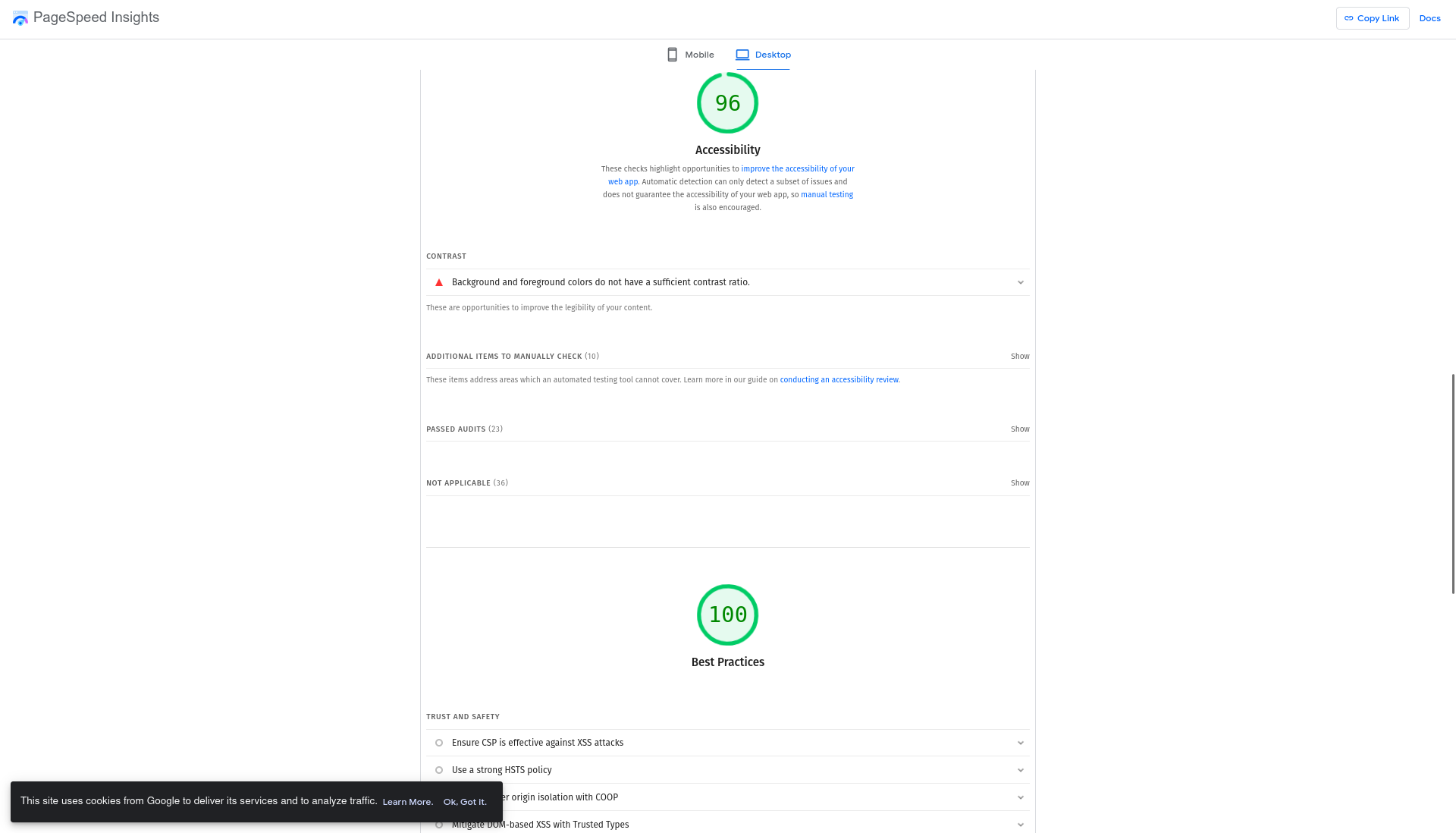
✅ Fix 9: Post-deploy CLS & contrast refinements ✅ FIXED
After deploying all fixes and re-running PageSpeed, two remaining issues surfaced:
Problem 1 — CLS 0.113 on mobile (above 0.1 “good” threshold):
font-display: swap in the Google Fonts URL causes a layout shift when web fonts (Inter, JetBrains Mono) replace system fallbacks. The text reflows because font metrics differ between families.
Fix: CSS @font-face override declarations with size-adjust that match the web font metrics to their fallbacks, so the swap causes zero reflow:
/* Font metric overrides — prevent CLS from font swap */
@font-face {
  font-family: 'JetBrains Mono Fallback';
  src: local('Courier New');
  size-adjust: 108%;
  ascent-override: normal;
  descent-override: normal;
  line-gap-override: normal;
}
@font-face {
  font-family: 'Inter Fallback';
  src: local('Arial');
  size-adjust: 100%;
  ascent-override: normal;
  descent-override: normal;
  line-gap-override: normal;
}

/* Updated font stacks to include metric-matched fallbacks */
--mono: 'JetBrains Mono', 'JetBrains Mono Fallback', 'Fira Code', monospace;
--sans: 'Inter', 'Inter Fallback', system-ui, -apple-system, sans-serif;
The browser uses the fallback @font-face (e.g., Courier New at 108% size) while the web font loads. When the swap happens, the text occupies the same space — no layout shift.
Problem 2 — Desktop accessibility still 96 (contrast on glass backgrounds):
The --muted color (#6889a6) achieved 5.4:1 on the pure background (#040a12), but the nav’s backdrop-filter: blur() creates an effective background lighter than #040a12. On these glass surfaces, the contrast dropped below 4.5:1.
Fix: Bumped --muted from #6889a6 → #7090b0 (5.96:1 on --bg, 5.44:1 on glass surfaces):
/* BEFORE */
--muted: #6889a6;  /* 5.4:1 on bg, but fails on glass */

/* AFTER */
--muted: #7090b0;  /* 5.96:1 on bg, 5.44:1 on glass ✅ */
Post-deploy results (March 8, 2026)
Actual results after deploying all 8 fixes:
| Metric | Desktop (before) | Desktop (after) | Mobile (before) | Mobile (after) |
|---|---|---|---|---|
| Performance | 90 | 90 | 58 | 87 (+29) |
| Accessibility | 96 | 96 | 96 | 100 (+4) |
| FCP | 1.3s | 1.4s | 6.7s | 2.8s |
| LCP | 1.3s | 1.4s | 6.7s | 2.8s |
| Speed Index | 1.8s | 1.4s | 9.4s | 2.9s |
| TBT | 0ms | 0ms | 0ms | 0ms |
| CLS | 0 | 0.076 | 0 | 0.113 |
| Best Practices | 100 | 100 | 100 | 100 |
| SEO | 100 | 100 | 100 | 100 |
Key wins:
- Mobile Performance: 58 → 87 (+29 points) — the biggest impact for SEO (Mobile-First Indexing)
- Mobile Accessibility: 96 → 100 — perfect score
- Mobile FCP/LCP: 6.7s → 2.8s — 58% faster first paint
- Mobile Speed Index: 9.4s → 2.9s — 69% faster perceived load
Remaining after Fix 9 (CLS + contrast):
- CLS should drop below 0.1 with the font
size-adjustfallbacks - Desktop accessibility should hit 100 with the
--mutedbump to#7090b0 - Cache lifetimes (Fix 5) still pending — requires Nginx deploy
Why mobile matters most: Google uses Mobile-First Indexing — the mobile score is what actually affects your ranking. Going from 58 to 87 is the single highest-impact improvement we made for SEO.
Baseline metrics (March 8, 2026)
Formal record of the zero point for future comparison:
╔══════════════════════════════════════════════════════════════╗
║                    BASELINE — 03/08/2026                     ║
╠══════════════════════════════════════════════════════════════╣
║                                                              ║
║  "rafael cavalcanti da silva"                                ║
║    → Google position: NOT APPEARING (outside top 100)        ║
║    → Closest result: namesakes on Jusbrasil                  ║
║                                                              ║
║  "rafael cavalcanti"                                         ║
║    → Google position: NOT APPEARING (outside top 100)        ║
║    → SERP dominated by: LinkedIn, Instagram, Escavador       ║
║                                                              ║
║  "rafaelroot"                                                ║
║    → Google position: NOT TESTED (keyword doesn't exist)     ║
║    → Search volume: 0                                        ║
║                                                              ║
║  "rafael root reverse engineering"                           ║
║    → Google position: NOT TESTED                             ║
║    → Search volume: 0                                        ║
║                                                              ║
║  Indexed pages: 0                                            ║
║  Search Console impressions: 0                               ║
║  Organic clicks: 0                                           ║
║  Known backlinks: 0                                          ║
║                                                              ║
╚══════════════════════════════════════════════════════════════╝
Detailed 12-week timeline
Phase 1 — Foundation (Weeks 1-2)
| Day | Task | Status |
|---|---|---|
| D1 (Mar 8) | Document SERP baseline | ✅ |
| D1 (Mar 8) | Write Part 1 article (this one) | ✅ |
| D1 (Mar 8) | Fix title tags (full name in all locales) | ✅ |
| D1 (Mar 8) | Implement Analytics.astro component (GA4) | ✅ |
| D1 (Mar 8) | Verify schema.org Person on homepage | ✅ already existed |
| D1 (Mar 8) | Run PageSpeed Insights — first analysis | ✅ Desktop 90/96/100/100, Mobile 58/96/100/100 |
| D1 (Mar 8) | Fix render-blocking CSS (fonts + devicon async) | ✅ |
| D1 (Mar 8) | Fix accessibility contrast (—muted color) | ✅ |
| D1 (Mar 8) | Fix mobile perf: content-visibility + reduce GPU effects | ✅ |
| D1 (Mar 8) | Audit against Google’s official SEO guidelines | ✅ |
| D1 (Mar 8) | Fix robots.txt — unblock /_astro/ CSS from Googlebot | ✅ |
| D1 (Mar 8) | Remove <meta name="keywords"> (Google ignores it) | ✅ |
| D1 (Mar 8) | Add hreflang to blog articles (translationKey system) | ✅ |
| D1 (Mar 8) | Improve image alt text (descriptive context) | ✅ |
| D1 (Mar 8) | Fix site name structured data (WebSite name + alternateName + trailing slash) | ✅ |
| D1 (Mar 8) | Optimize for sitelinks (add crawlable Blog link to footer nav) | ✅ |
| D1 (Mar 8) | Add ProfilePage structured data (upgraded from WebPage) | ✅ |
| D1 (Mar 8) | Optimize title links (remove redundant site name, fix length, single delimiter) | ✅ |
| D1 (Mar 8) | Deploy all fixes + re-run PageSpeed: Mobile 58→87, Accessibility 96→100 | ✅ |
| D1 (Mar 8) | Fix CLS (font size-adjust fallbacks) + contrast (#7090b0 for glass backgrounds) | ✅ |
| D2 (Mar 9) | Configure Google Search Console | ✅ |
| D2 (Mar 9) | Submit sitemap-index.xml | ✅ |
| D3 (Mar 10) | Create Google Analytics 4 property | ⬜ |
| D3 (Mar 10) | Set PUBLIC_GA_ID in .env | ⬜ |
| D5 (Mar 12) | Optimize Nginx (brotli, headers, cache) | ⬜ |
| D7 (Mar 14) | Week 1 Checkpoint: verify indexation | ⬜ |
Phase 2 — Content & Authority (Weeks 3-6)
| Week | Task |
|---|---|
| W3 | Create/optimize profiles: GitHub, LinkedIn, dev.to |
| W3 | Publish Part 2 of the series |
| W4 | First blog post optimized for “rafael cavalcanti developer” |
| W4 | Submit site to dev directories (awesome lists, etc.) |
| W5 | Cross-links between existing articles |
| W5 | Create /about page with full schema.org Person |
| W6 | Guest post or significant open source contribution |
| W6 | Month 1 Checkpoint: check positions in Search Console |
Phase 3 — Measurement & Optimization (Weeks 7-12)
| Week | Task |
|---|---|
| W7 | Analyze Search Console data (impressions, clicks, CTR) |
| W7 | A/B test title tags on articles with lowest CTR |
| W8 | Publish Part 3 article with measured results |
| W9 | Optimize pages based on real Core Web Vitals |
| W10 | Expand FAQ Schema on technical articles |
| W11 | Backlink review and link building opportunities |
| W12 | Final report: compare SERPs with baseline |
What’s coming in Part 2
In the next article (planned for weeks 3-4), we’ll document:
- Results from the first 2 weeks — how many pages did Google index? Any impressions yet?
- Real GA4 implementation — custom events, SEO dashboard, automatic reports
- Technical link building — how to use GitHub, Stack Overflow and open source contributions to build authority
- Core Web Vitals in practice — PageSpeed Insights results before/after Nginx optimizations
- Search Console analysis — first real data on impressions and average position
Summary checklist — what we did today
- Baseline documented: screenshots and tables for all target keywords
- Tech stack defined: Astro 5.17 + Nginx + GA4 + Search Console
- Astro configured for SEO: sitemap with priorities, i18n, drafts
- Nginx configuration template with brotli, HSTS, optimized cache
- Analytics.astro component created with GA4 + engagement events
- Title tags fixed: full name across all 5 locales
- schema.org: Person + WebSite + ProfilePage + Article + Breadcrumbs
- Open Graph + Twitter Cards + hreflang + canonical (already existed)
- Keyword strategy with difficulty analysis
- 12-week timeline divided into 3 phases
- Baseline metrics formally recorded
- Google Search Console configured + sitemap submitted (Mar 8 — 16 URLs discovered, status: Success)
- PageSpeed Insights: Desktop 90/96/100/100 — Mobile 58/96/100/100
- Fixed render-blocking CSS: fonts + devicon loaded async (desktop: 980ms, mobile: 4,570ms savings)
- Fixed accessibility contrast:
--muted→ 5.4:1 ratio (WCAG AA) - Fixed mobile performance:
content-visibility: auto+ reducedbackdrop-filteron mobile - Audited against Google’s official SEO guidelines
- Fixed robots.txt: removed
Disallow: /_astro/— Googlebot was blocked from rendering CSS - Removed
<meta name="keywords">from both layouts — Google explicitly ignores this tag - Added hreflang to blog articles via
translationKeysystem — cross-links PT-BR ↔ EN translations - Improved image alt text with descriptive context (not just product names)
- Fixed site name structured data: WebSite
name: 'rafaelroot.com'+alternateNamearray + trailing slash onurl - Optimized for sitelinks: added crawlable Blog link to footer nav (real URL, not #anchor)
- Added ProfilePage structured data: upgraded homepage from
WebPagetoProfilePagewithmainEntityreferencing Person - Optimized title links: removed redundant
rafaelroot.comfrom all titles (site name shown separately via WebSite schema), fixed length under 60 chars, single—delimiter - Post-deploy PageSpeed: Mobile 58→87 (+29 perf), 96→100 accessibility | Desktop 90/96/100/100
- Fixed CLS:
@font-facefallbacks withsize-adjustfor JetBrains Mono (108%) and Inter (100%) — prevents layout shift fromfont-display: swap - Fixed contrast on glass backgrounds:
--mutedbumped from#6889a6→#7090b0(5.96:1 on bg, 5.44:1 on glass surfaces) - Pending: Create GA4 property + set
PUBLIC_GA_ID - Pending: Deploy with optimized Nginx (cache headers)
- Pending: Re-run PageSpeed after Fix 9 deploy (expect CLS < 0.1, Desktop Accessibility 100)
- Pending: Verify Google renders the page correctly (URL Inspection → Screenshot)
Immediate next step: Deploy the CLS + contrast refinements (Fix 9), then re-run PageSpeed to verify CLS drops below 0.1 and Desktop Accessibility hits 100. After that, configure GA4 and optimize Nginx cache headers.
This article is part of the “From zero to Google’s top” series. Follow Part 2 (execution and tools) and Part 3 (coming soon) to see the results in real time.
Last updated: March 8, 2026